

Situation
Most small restaurants run their menu in three or four different places at once: a printed menu, a PDF on the website, maybe a QR code, sometimes a third-party delivery listing. Every price change or seasonal swap means updating each of these separately – usually by emailing a designer or wrestling with software that wasn’t built for a busy kitchen.
Coming from a background in hospitality ourselves, we kept seeing the same problem: owners and managers don’t have time, design skills, or a desk to sit at – they need to make a change from their phone, between services, and have it go live everywhere at once.
Objective
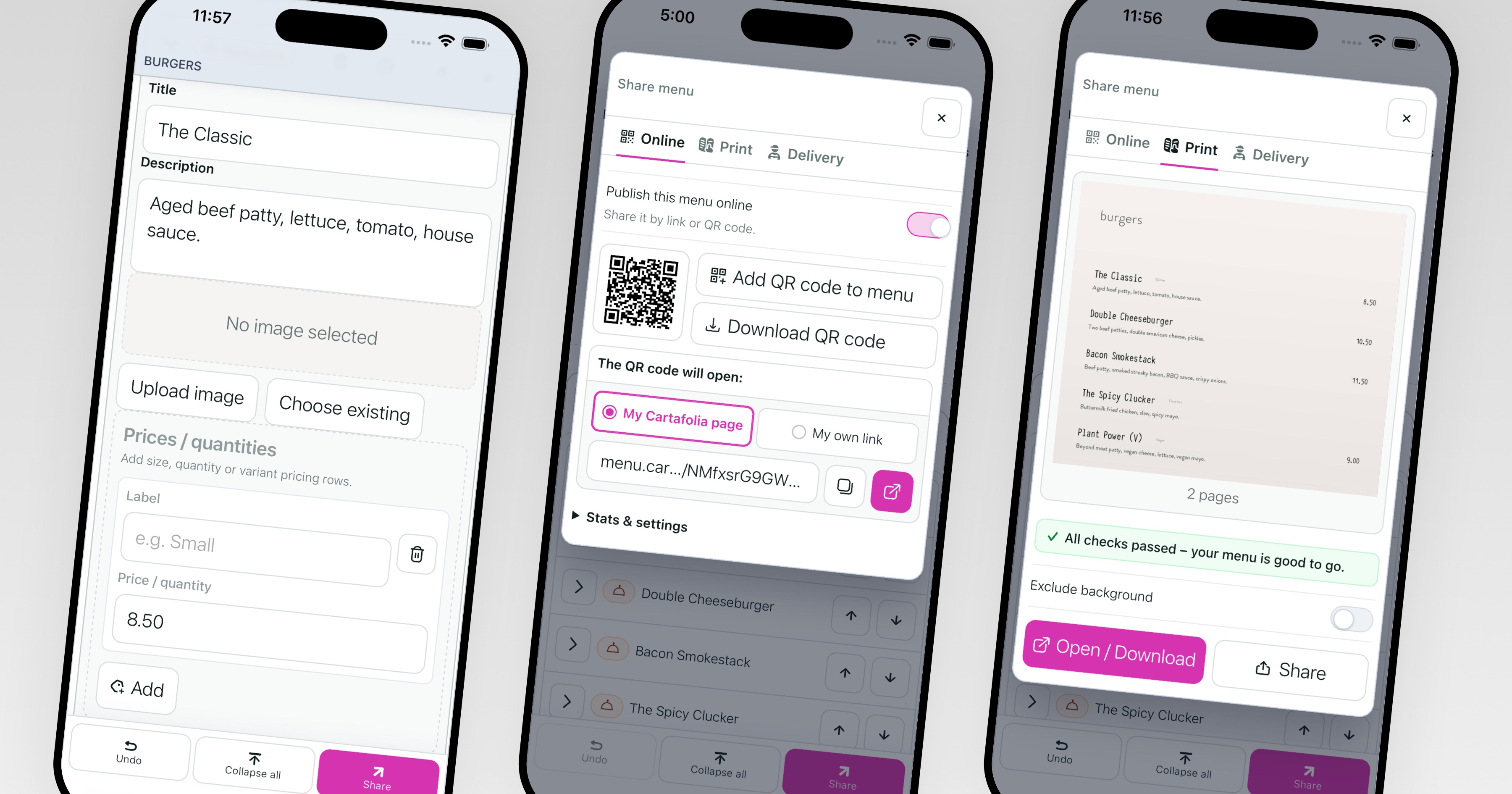
Design and build a tool that lets anyone – no design or technical background needed – create and update a restaurant menu from their phone, and publish it instantly as a print-ready PDF, a public web page, and a QR-linked digital menu, all from a single edit.
Approach
Rather than the traditional path – research, Figma mockups, a polished prototype, then months of development followed by user testing – we used a faster, AI-assisted workflow: prototype, build, deploy and test in the same loop, using Claude to help generate and refine working code directly. This let us skip the long mockup-to-build handoff and instead validate ideas against a real menu and a real restaurant owner from day one.

Process
1. Grounding the problem in real hospitality experience Years working in restaurants made the core pain point obvious: menu management is fragmented across formats, and most tools assume a level of design skill or desk-bound time that owners don’t have.
2. Building the core engine Designed a flexible, block-based menu editor – dishes, sections, allergen and dietary tags – that automatically lays itself out for both screen and print, without the user touching a layout tool.

3. Testing on a real, live menu Rather than synthetic user testing, the builder has been shaped directly against Garage Senigallia’s actual menu – real dishes, real edits, real day-to-day use – surfacing practical issues faster than a staged usability test would.
4. Designing mobile-first, by default Every screen in the builder was designed to be fully usable one-handed, on a phone, with no onboarding or manual required.
5. One menu, every output A single saved menu renders into a print-ready PDF, a public hosted web page, and a QR code – so one update goes live everywhere immediately, with no re-exporting or re-uploading.


Takeaways
Faster, realer iteration. Development compressed what would normally be a months-long design-to-build cycle into days, while testing against real data and a real user the entire time.
Real usage beats simulated testing. Building alongside an actual restaurant surfaced friction points – confusing buttons, awkward flows – far quicker than a scripted usability session would have.
Simplicity has to be defended at every step. Designing for “no technical knowledge needed” means constantly stripping back, not adding – every new control has to earn its place on a small screen.
Outcome
Cartafolia is live and in active use for Garage Senigallia’s full menu, with the builder, PDF generation and public web publishing working end-to-end. The product continues to evolve feature-by-feature, driven by real restaurant use rather than a fixed spec.
Notes
This is a self-initiated, ongoing product built in-house at Web Design Mattrs, developed using an experimental AI-assisted workflow rather than a traditional agency process. Screenshots and screen recordings throughout show the builder and published menu in real use.
Now in beta
Get in early, help shape Cartafolia
Free access for early testers. Tell us what your kitchen actually needs and we’ll build it in.


