Four things we see again and again on small business websites, and the fixes that take an afternoon.
Most hacked sites we were called in to clean up weren’t hacked because someone clever targeted them. They were hacked because a door was left open eighteen months ago and nobody went back to shut it.
Not a criticism. If you run a small shop, the website is one job among forty. It works, so you stop thinking about it. The problem is that “it works” and “it’s safe” aren’t the same thing, and the gap between them only shows up on the day something goes wrong.
1. The plugins nobody has updated since launch
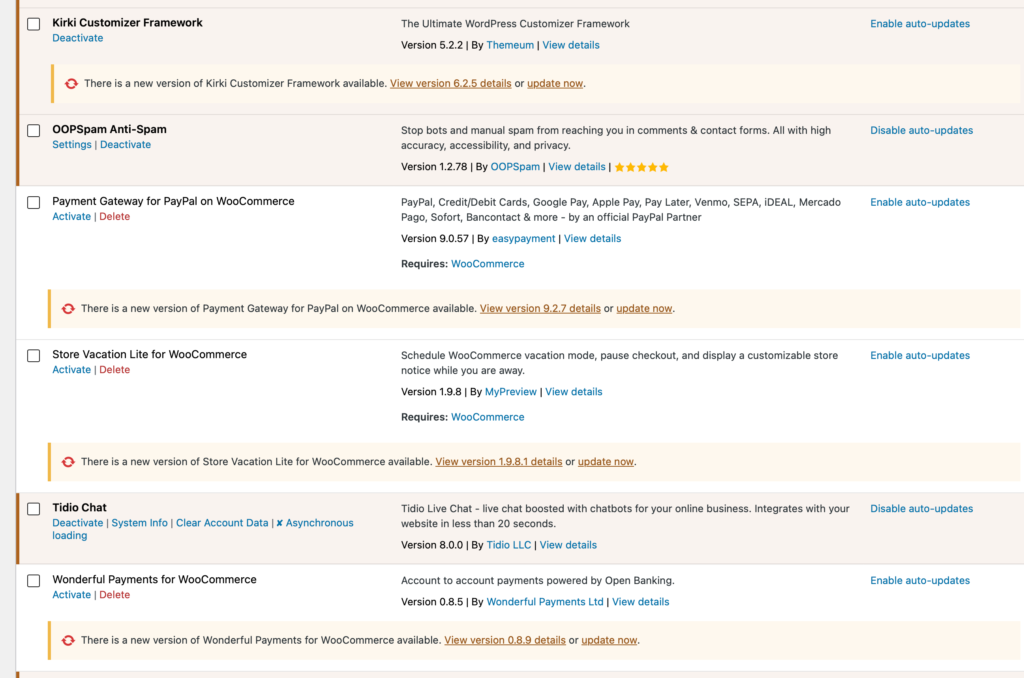
Many WordPress sites are compromised through a known vulnerability in an outdated plugin. Known meaning it’s been publicly documented, patched by the developer and added to automated scanning tools that trawl the web looking for sites still running the old version.
Your site is not being singled out. A bot is checking millions of sites for the same weakness, and yours either has it or it doesn’t.
It matters most on the plugins closest to your money. Payment gateways, checkout extensions, anything handling card details or customer accounts. Those are the ones worth updating the week a patch lands, not the quarter.
Two things that look fine but aren’t
Expired licences. Premium plugins keep working when the licence lapses. They just stop updating. No broken layout, and some will even suppress the “update available” notice. The plugin quietly ages out while you assume it’s current. If you’re paying for a plugin, make sure the renewal actually went through.
Nulled plugins. These are pirated copies of premium plugins with the licence check removed, given away free or ‘bundled’ with work and never maintained after. It’s worth understanding why someone would go to that effort and then charge nothing: a good share of them ship with a backdoor added. You’re not waiting to be found by a scanner. You’ve installed the problem yourself.
This one often isn’t the site owner’s doing. We’ve inherited sites where a previous developer used nulled plugins to keep the build cost down and never mentioned it. If you’re not sure what’s on your site, that’s worth checking before anything else on this list.
2. The admin accounts you forgot you created
Open your Users page and count the administrators.
We regularly find six, eight, a dozen. A developer from a 2021 redesign. An SEO contractor from a trial that didn’t work out. A plugin support agent who needed access for one afternoon. Someone’s cousin. All still there, all still with full control of the site and sometimes your hosting panel too, which means emails, invoices and contracts as well.
Every one of those is a live key to your business. And every one is only as strong as the password behind it, which you have no way of knowing. Reused passwords are how a great many sites are eventually broken into: not because your site was cracked, but because a password someone used on your site also protected an account somewhere else that got breached.
On top of that, if your shop keeps customer names, addresses and order histories, it’s worth asking a harder question: can you honestly say you know who has access to that data and why? Under UK GDPR you’re expected to be able to answer that. We’re web people rather than lawyers, so take proper advice if you’re unsure, but “I don’t know who half these accounts belong to” is not a comfortable position to be in.
3. The people who did nothing wrong
We had a client site compromised through a freelancer’s account. The freelancer wasn’t dodgy as far as we could tell. They may well have had malware on their own machine, their saved credentials were lifted and they probably had no idea it had happened.
The site ended up stuffed with hidden spam pages pushing online casinos. Google noticed before the client did.
The lesson isn’t “don’t trust freelancers”, because we work with brilliant ones. It’s that access you granted is access you’re responsible for. Give it for the length of the job, then take it back. A good freelancer will expect that and won’t be remotely offended.
And it isn’t only other people’s access you should worry about. It’s ours.
A while back we were updating redirects for a client and applied them to the wrong site’s .htaccess. The wrong site belonged to a client we hadn’t worked with in months, but whose access was still sitting in our automated tooling, because nobody had ever taken it out. Their entire website started redirecting somewhere it shouldn’t. They rang us within minutes, we reverted it and it was over inside half an hour.
No harm done, and entirely our error. But it only happened because the access was still there to misuse. If they’d revoked it when the work finished, the worst case that day would have been us getting an error message.
We changed how we handle client credentials after that. The wider point stands though: access granted for a job should end with the job. Including ours.
4. The dev site nobody switched off
Staging sites, old rebuilds, that /new/ folder from the redesign two years ago. They’re usually running older software, weaker passwords, no monitoring and nobody looking at them.
We’ve seen a forgotten dev site start pumping out spam email and get the main domain’s reputation blacklisted. The live site was perfectly maintained. It didn’t matter.
While you’re at it, check how you log in. If your hosting control panel loads over http:// rather than https://, your password travels in plain text, readable to anyone on the same wifi or network. We still see this on providers one of our clients uses today. If your host can’t offer an encrypted login panel in 2026, that tells you something about the rest of their security.
What a clean-up actually costs you
Cleaning an infected database properly is slow, expensive and never guaranteed. Malware hides in serialised data, scheduled tasks, injected admin users and theme files. You can spend hours and still miss something. Most clients, understandably, don’t want to pay for that. The usual recommendation is to roll back to a clean backup.
Which means everything since that backup is gone. Orders. Customer accounts. Stock levels. Enquiries. We back up every site on our platform daily, on-site and off-site, but if your last known-clean backup is three weeks old, you’ve lost three weeks of trading records and you’re emailing customers to ask what they bought.
That’s the real cost. Not the clean-up invoice, but the trading data and the trust of customers who handed you their details in the first place.
The afternoon that prevents most of this
None of this is complicated. Most of it is one sitting, and once it’s done, keeping on top of it is twenty minutes a few times a year.
- Audit your users. Delete every administrator you can’t name and justify. If someone needs access occasionally, downgrade them to Editor or Shop Manager. Subscriber works if you just want to keep the account on file so they don’t have to register again later.
- Update everything, starting with payments. Then check for plugins that are abandoned. No update in over a year usually means no security patches either.
- Delete or lock down old dev and staging sites. If you need them, password-protect them at server level and keep them updated too.
- Turn on two-factor authentication for every admin account. It’s the single highest-value change on this list, and it’s what stops a leaked password from becoming a break-in.
- Check your login is encrypted. Site admin and hosting panel both. Look for the padlock.
- Know where your backups are and how old they are. Daily is the minimum for a shop. Test that one actually restores.
- Set an expiry habit for contractor access. Grant it for the job, remove it when the invoice is paid.
Do those seven and you’ve closed the doors behind the overwhelming majority of small business hacks we get called about.
Where we come in
Worth being clear about the division of labour here. Our hosting runs on hardened Red Hat Linux with several layers of protection, bot filtering and daily automated scanning. That’s the floor, and it’s a good one. But no server hardening in the world stops a vulnerable payment plugin or an admin account belonging to someone you’ve never met. The platform protects the platform. The site is still yours.
So we’ve built two things for exactly that gap.
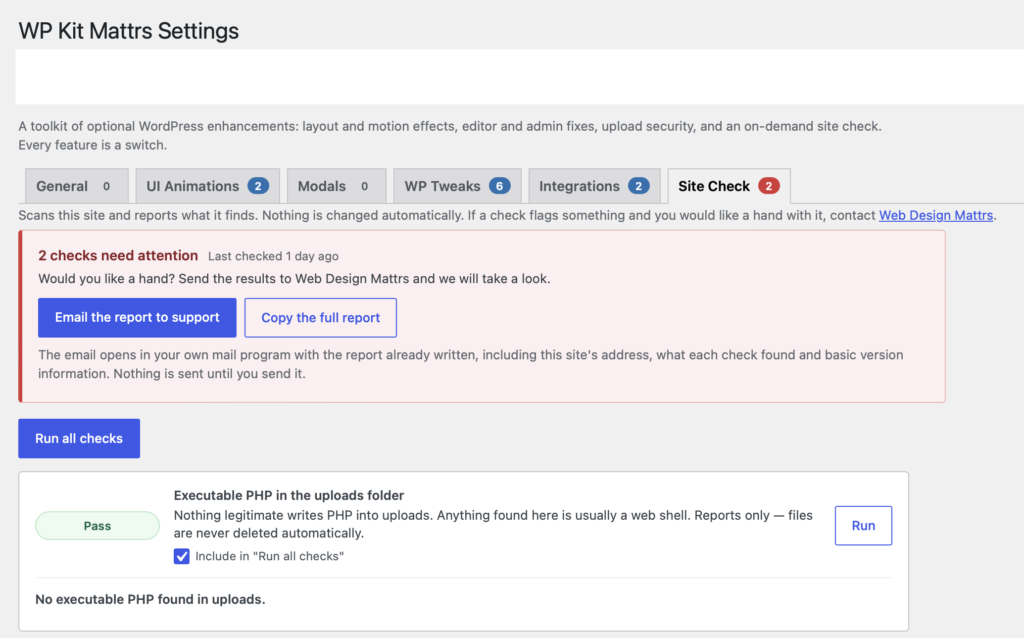
WP Kit Mattrs is our own WordPress plugin. Its scanner checks the things people rarely check by hand: WordPress core file integrity, SVG and other risky uploads, stray scripts sitting in your uploads folder and known vulnerabilities in what you’ve installed, cross-referenced against a public vulnerability database. It’s a manual scan, so you run it when you want it. That’s deliberate, but it does mean somebody has to remember.
CarePlus is for when you’d rather it wasn’t your job at all. We handle updates, monitoring, backups and the regular access reviews, including the boring ones nobody remembers to do. It’s the difference between hoping your site is fine and knowing someone checked on Tuesday.
If you’re not on a care plan, that’s absolutely fine, but the maintenance still has to happen and it has to happen by you. Put a recurring reminder in your calendar. Monthly for updates, quarterly for the user audit. Twenty minutes, four times a year, against the week you’d spend rebuilding from a backup.
We’d much rather help you avoid that week than bill you for it.
Not sure where your site stands? Get in touch and we’ll take a look.


Leave a Reply